Type naturally in Bengali across Safari, Notes, Word, Slack, and Terminal using familiar phonetic rules. Zero lag, zero telemetry, and built purely for modern Apple Silicon Macs.
Type phonetic English below and see how Bongo translates your words in real time with an authentic macOS HUD simulation.
Designed to look and feel right at home on macOS Sequoia, Sonoma, and Ventura.
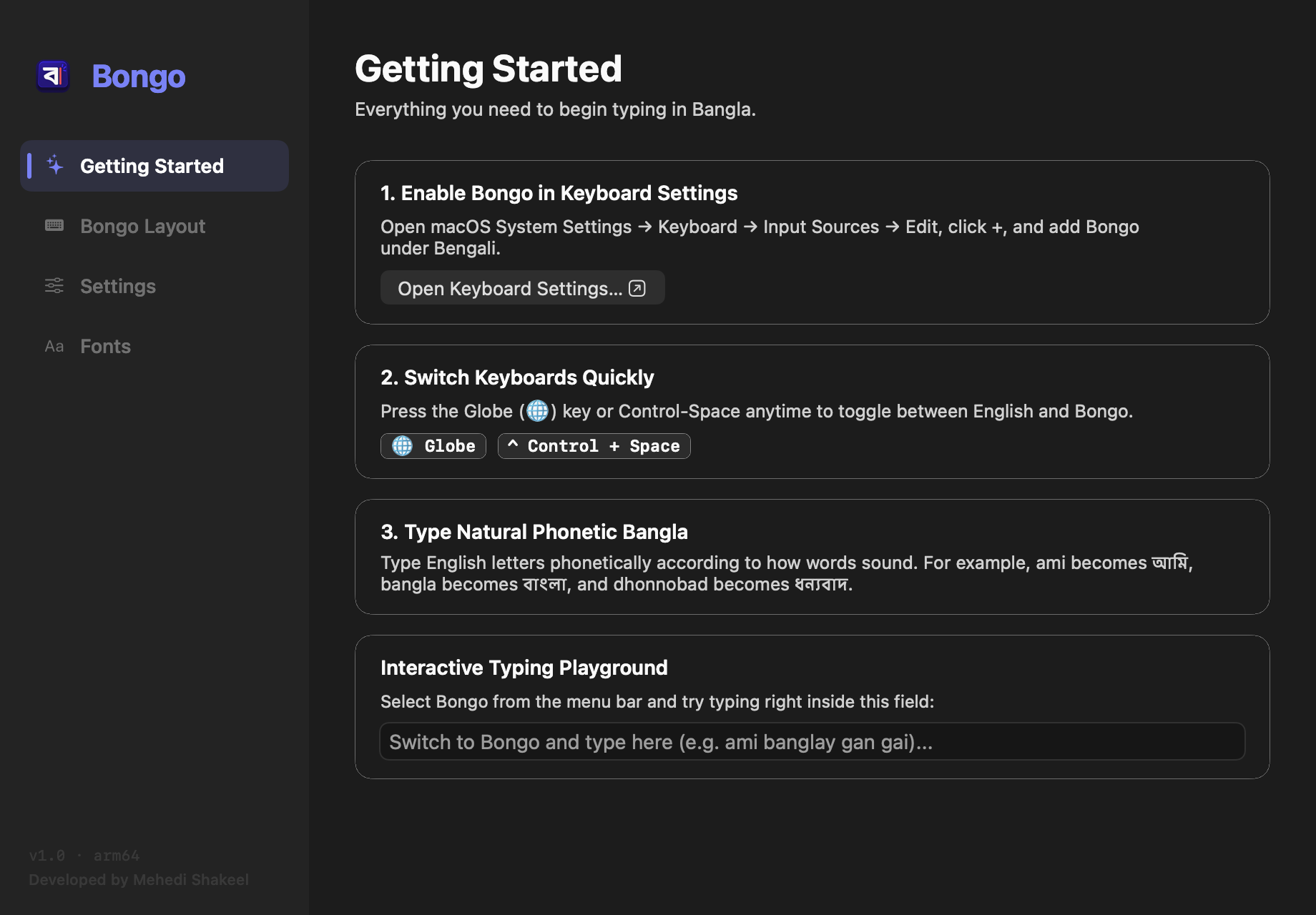
One-click link to macOS Keyboard settings, quick shortcut cheat sheet, and a built-in playground to verify your typing setup instantly.
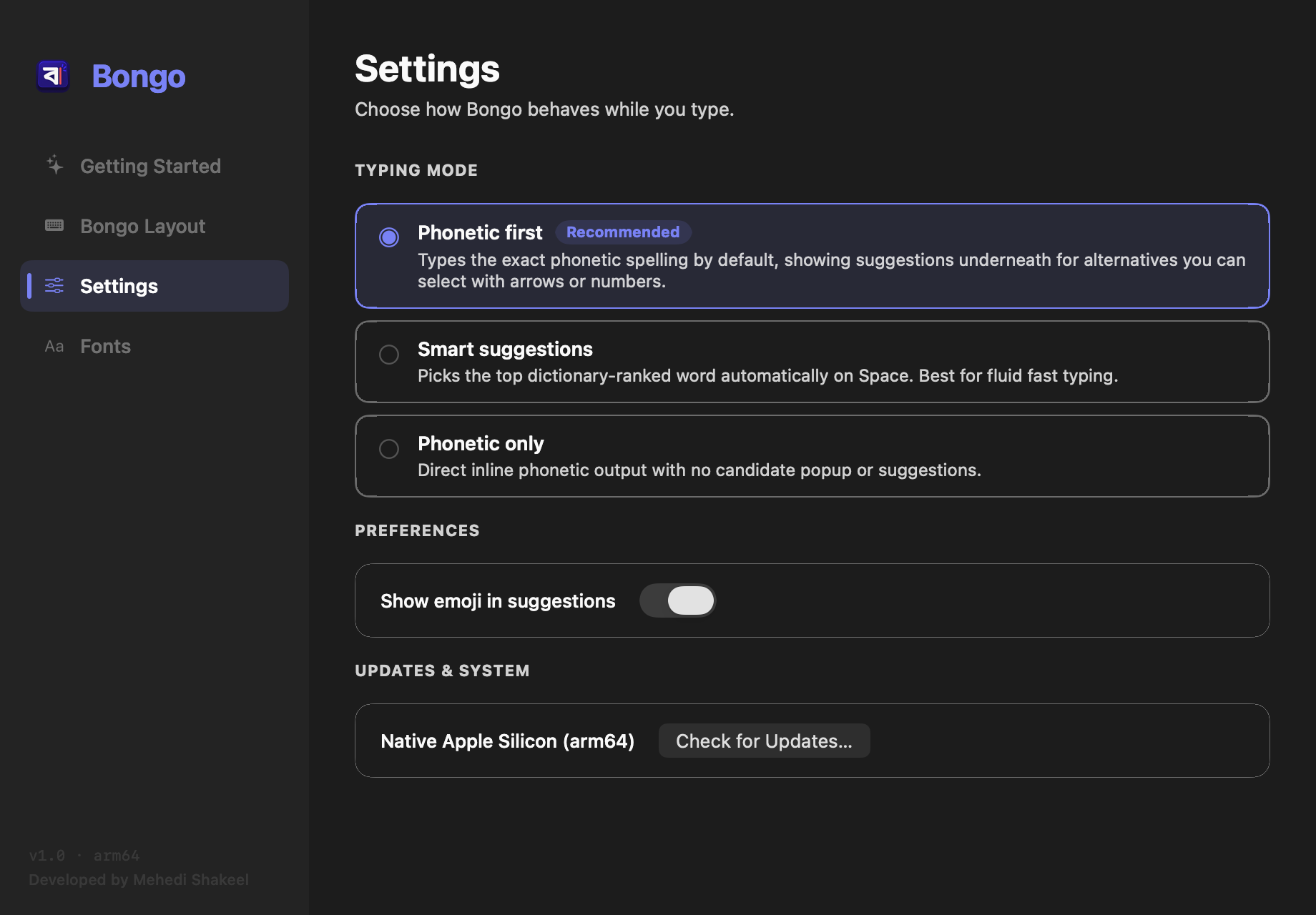
Choose between Phonetic first (recommended), Smart suggestions, or Phonetic only. Toggle emoji suggestions and check for updates effortlessly.
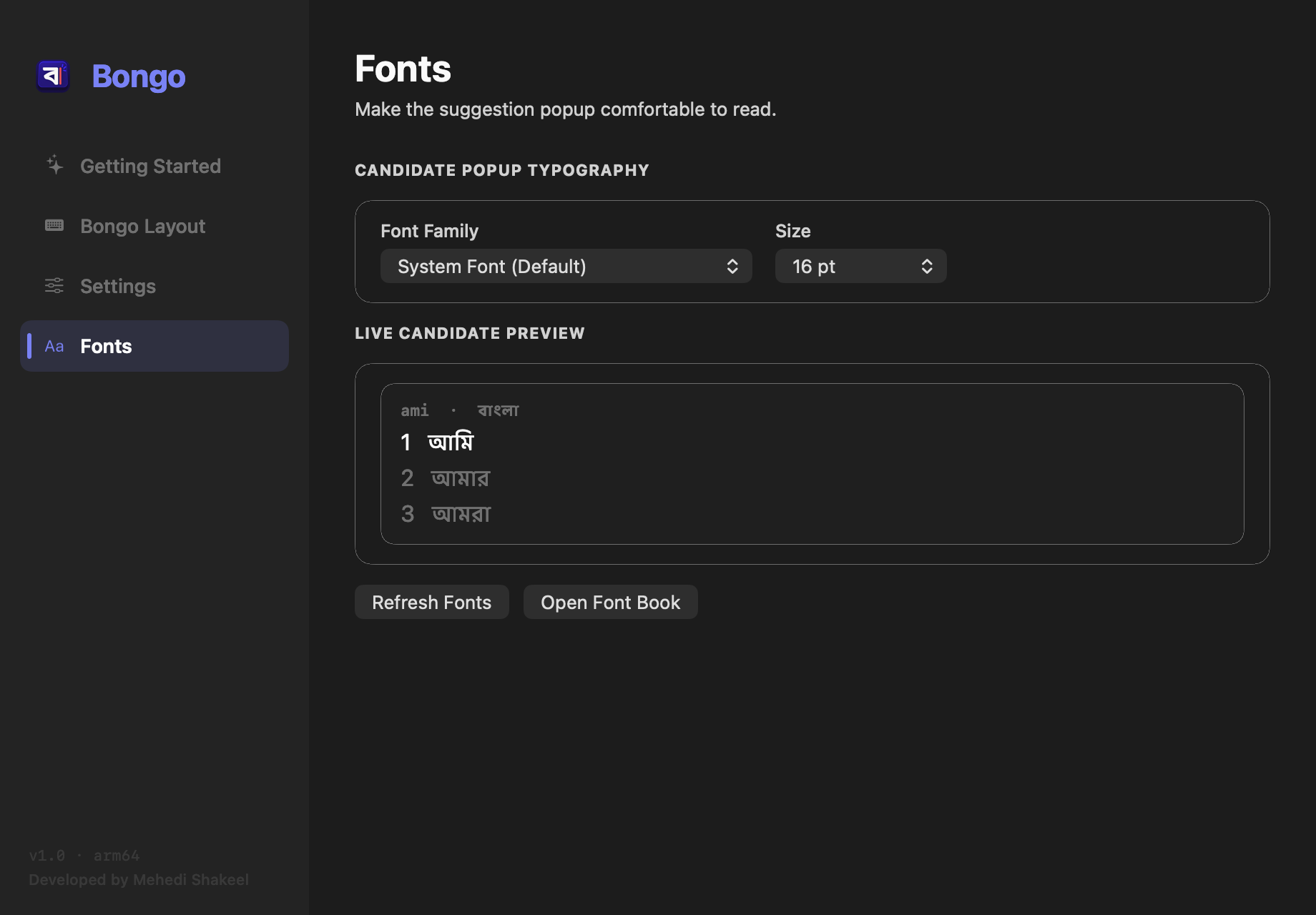
Select any Bengali font installed on your Mac (Kohinoor Bangla, Noto Sans Bengali, Ekush, July, etc.) with real-time candidate size adjustment.
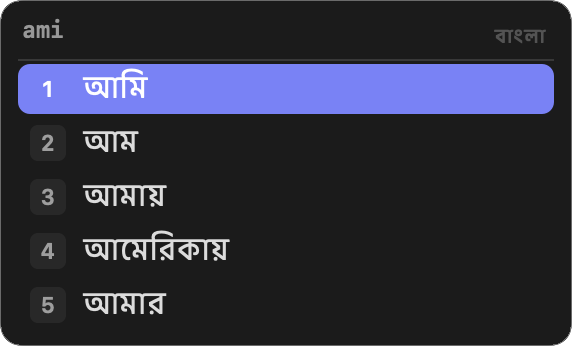
Floating translucent candidate window with fast numbered shortcuts [1], [2], [3], smooth arrow navigation, and high-contrast pill selection.
Unlike legacy Intel keyboards running through emulation, Bongo was crafted from the ground up for modern macOS.
Compiled strictly for arm64 (aarch64). Zero Intel baggage, zero Rosetta translation, and instant wake from sleep with minimal memory footprint.
Follows the proven phonetic transliteration standard millions know by heart. Type naturally (ami → আমি, kkh → ক্ষ) with zero learning curve.
Your keystrokes, personal dictionary, and typing habits never leave your Mac. No network telemetry, no tracking, and no Accessibility logging permissions required.
Powered by the proven riti phonetic conversion engine with comprehensive dictionary support, contextual suffixes, autocorrect, and smart candidate ranking.
Native InputMethodKit architecture ensures Bongo works flawlessly across every macOS app: Safari, Chrome, Xcode, Mail, Pages, Slack, and even Terminal.
Tailor font family and sizing for candidates, choose among three typing modes, toggle emoji completion, and access settings right from the macOS menu bar.
No complicated terminal commands or root passwords needed.
Download Bongo-1.0-macos-arm64.dmg, open it, and drag Bongo.app into your Applications folder.
Launch Bongo from Applications. It will register the keyboard service with macOS automatically without requiring administrator rights.
In System Settings → Keyboard → Input Sources, click + and add Bongo (under Bengali). Switch anytime with Globe / fn or Ctrl + Space!
Search any letter, conjunct, or vowel sound to find its exact phonetic keystroke.
| Category | Bangla Letter | Keystroke | Example Word |
|---|---|---|---|
| Vowel | অ | o | oneck (অনেক) |
| Vowel | আ | a | ami (আমি) |
| Vowel | ই | i | iti (ইতি) |
| Vowel | ঈ | I | Ishor (ঈশ্বর) |
| Vowel | উ | u | uth (উঠ) |
| Vowel | ঊ | U | Ushor (ঊষর) |
| Vowel | ঋ | rri | rrishi (ঋষি) |
| Vowel | এ | e | ektara (একতারা) |
| Vowel | ঐ | OI | OIkyoboddho (ঐক্যবদ্ধ) |
| Vowel | ও | O | Ol (ওল) |
| Vowel | ঔ | OU | OUshodh (ঔষধ) |
| Consonant | ক | k | kothay (কোথায়) |
| Consonant | খ | kh | khobor (খবর) |
| Consonant | গ | g | gan (গান) |
| Consonant | ঘ | gh | ghor (ঘর) |
| Consonant | ঙ | Ng | roNg (রং) |
| Consonant | চ | c / ch | chad (চাঁদ) |
| Consonant | ছ | Ch | Chobi (ছবি) |
| Consonant | জ | j | jol (জল) |
| Consonant | ঝ | jh | jhor (ঝড়) |
| Consonant | ঞ | NG | miya (মিঞা) |
| Consonant | ট | T | Taka (টাকা) |
| Consonant | ঠ | Th | Thik (ঠিক) |
| Consonant | ড | D | Daak (ডাক) |
| Consonant | ঢ | Dh | Dhak (ঢাক) |
| Consonant | ণ | N | gun (গুণ) |
| Consonant | ত | t | tumi (তুমি) |
| Consonant | থ | th | thako (থাকো) |
| Consonant | দ | d | din (দিন) |
| Consonant | ধ | dh | dhon (ধন) |
| Consonant | ন | n | naam (নাম) |
| Consonant | প | p | pani (পানি) |
| Consonant | ফ | f / ph | ful (ফুল) |
| Consonant | ব | b | boi (বই) |
| Consonant | ভ | bh / v | bhalo (ভালো) |
| Consonant | ম | m | maa (মা) |
| Consonant | য | z | zodi (যদি) |
| Consonant | র | r | raat (রাত) |
| Consonant | ল | l | laal (লাল) |
| Consonant | শ | S / sh | shanti (শান্তি) |
| Consonant | ষ | Sh | kaShTo (কষ্ট) |
| Consonant | স | s | shob (সব) |
| Consonant | হ | h | haat (হাত) |
| Consonant | ড় | R | boRo (বড়) |
| Consonant | ঢ় | Rh | aaRha (আষাঢ়) |
| Consonant | য় | y | bhay (ভয়) |
| Consonant | ৎ | `t | utshob (উৎসব) |
| Consonant | ং | ng | shonglap (সংলাপ) |
| Consonant | ঃ | : | du:kho (দুঃখ) |
| Consonant | ঁ | ^ | cha^d (চাঁদ) |
| Conjunct | ক্ষ | kkh | kkhoma (ক্ষমা) |
| Conjunct | জ্ঞ | jnj / gy | gyan (জ্ঞান) |
| Conjunct | ক্ত | kt | rokto (রক্ত) |
| Conjunct | ন্দ | nd | anondo (আনন্দ) |
| Conjunct | ঙ্গ | ngg | bongo (বঙ্গ) |
| Conjunct | ষ্ণ | ShN | krishno (কৃষ্ণ) |
| Number | ১ ২ ৩ ৪ ৫ | 1 2 3 4 5 | Bengali Numerals |
| Number | ৬ ৭ ৮ ৯ ০ | 6 7 8 9 0 | Bengali Numerals |
Got questions about compatibility, permissions, or shortcuts? We have answers.
Yes, 100%. Bongo is compiled natively for Apple Silicon (arm64). It runs directly on every MacBook Air, MacBook Pro, Mac mini, iMac, Mac Studio, and Mac Pro powered by M1, M2, M3, M4, or future M-series processors running macOS 13 (Ventura), macOS 14 (Sonoma), or macOS 15 (Sequoia).
Apple's built-in keyboard uses traditional Bengali layout mapping which requires memorizing special character positions. Bongo provides intuitive Avro Phonetic typing: write Bengali sounds phonetically using standard English letters (e.g. typing ami produces আমি, dhonnobad produces ধন্যবাদ), with a 150,000+ word dictionary and instant autocorrect.
Absolutely not. Bongo is built on Apple's official native InputMethodKit framework. Unlike unofficial keyboard tools, Bongo does not require Accessibility permissions, does not log keystrokes, and has zero network telemetry. Your typing and personalized word selections remain strictly on your local device.
Simply tap the Globe key (fn / Globe) on your modern Mac keyboard, or press Control + Space. You can also click the input switcher icon in the top macOS menu bar anytime.
Yes! Open Bongo from your Applications folder (or choose "Settings..." from the Bongo menu bar item), navigate to the Fonts tab, and pick any installed Bengali font on your Mac (such as Kohinoor Bangla, Noto Sans Bengali, Ekush, etc.) with custom sizing and real-time live preview.
Yes. Bongo is 100% free with no subscriptions, in-app purchases, or ads. The entire codebase is open source under the MPL-2.0 license and available on GitHub.